
Digital learning has transformed how students, educators, universities, and organizations access educational content. Online courses, learning management systems (LMS), interactive lessons, virtual classrooms, and digital assessments have made education more flexible and accessible than ever before.
However, not every learner experiences digital education in the same way.
Some learners understand concepts better through visual explanations, while others prefer written instructions, audio explanations, demonstrations, or hands-on activities. Learners may also have different levels of prior knowledge, language proficiency, learning preferences, physical abilities, and access to technology.
When digital learning materials follow only one teaching approach, they can unintentionally create barriers for learners.
This is where Universal Design for Learning (UDL) becomes important.
Universal Design for Learning is an educational framework that helps instructional designers, educators, curriculum developers, and eLearning providers create flexible learning experiences that accommodate diverse learner needs.
Instead of designing a course for an assumed average learner and making adjustments afterward, UDL encourages designers to consider learner diversity from the beginning.
For educational institutions, publishers, and EdTech companies, adopting UDL principles can improve accessibility, learner engagement, knowledge retention, and overall learning effectiveness.
In this guide, we explore the Universal Design for Learning framework, its three core principles, practical implementation strategies, accessibility considerations, and how organizations can develop more inclusive digital learning experiences.
What Is Universal Design for Learning (UDL)?
Universal Design for Learning (UDL) is an evidence-informed educational framework developed to improve teaching and learning by accommodating individual differences among learners.
The framework encourages educators and instructional designers to provide multiple ways for learners to:
- Engage with learning activities.
- Access and understand educational information.
- Demonstrate their knowledge and skills.
The central idea behind UDL is that learning environments should be designed to reduce unnecessary barriers while maintaining meaningful academic expectations.
Traditional instructional approaches often rely on a single format, such as reading textbooks, listening to lectures, or completing written examinations. These approaches may work well for some learners but create difficulties for others.
UDL addresses this challenge by offering flexible learning pathways.
For example, an online science course might include:
- Written explanations of scientific concepts.
- Animated videos demonstrating processes.
- Audio explanations for important lessons.
- Interactive simulations.
- Downloadable study materials.
- Multiple assessment formats.
These options allow learners to interact with the same educational objectives through different methods.
UDL is not about lowering academic standards or creating separate courses for different learners. It is about designing learning experiences that offer multiple ways to achieve the same meaningful learning outcomes.
Why Is Universal Design for Learning Important in Digital Education?
The growth of online education has created opportunities for learners across different countries, educational backgrounds, and ability levels. However, digital accessibility and instructional flexibility remain important challenges.
A course may contain excellent academic information but still be difficult to use if videos lack captions, navigation is confusing, instructions are unclear, or assessments depend on only one method of responding.
Implementing Universal Design for Learning helps organizations address these challenges during the design and development process.
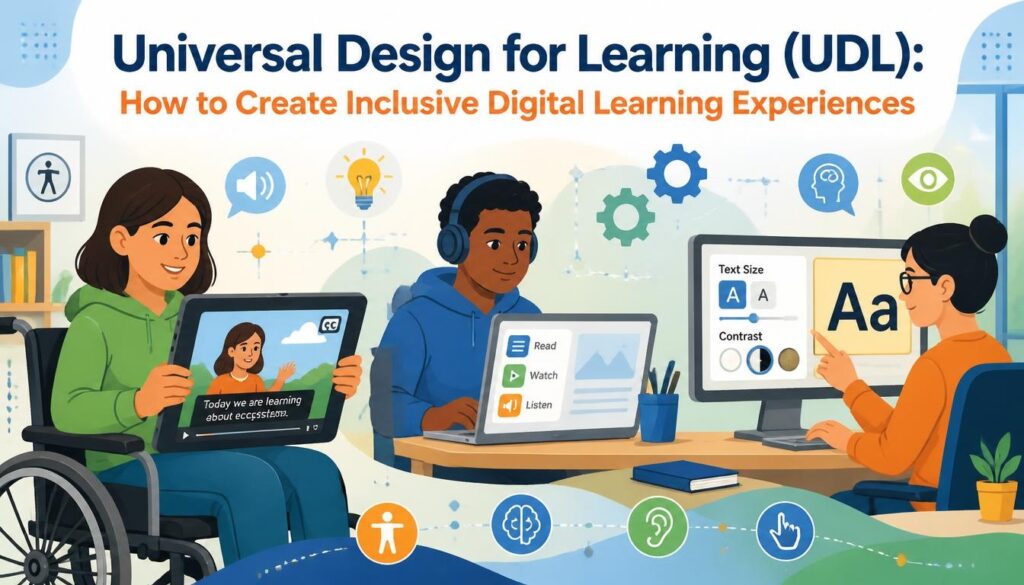
1. Supports Learners With Different Abilities
Learners may experience visual, auditory, physical, cognitive, or learning-related barriers when interacting with digital educational content.
UDL encourages designers to provide alternative ways to access information and participate in learning activities.
Examples include:
- Captions and transcripts for video lessons.
- Screen-reader-compatible learning materials.
- Keyboard-accessible navigation.
- Alternative text for meaningful images.
- Adjustable text size and readable layouts.
- Clear instructions and structured learning activities.
2. Improves Learner Engagement
Not every learner responds to the same instructional method.
Some learners prefer interactive exercises, while others engage more effectively with case studies, illustrations, demonstrations, or independent reading.
Offering different ways to engage with educational content can make online learning more relevant and motivating.
3. Encourages Personalized Learning
UDL supports flexible learning experiences that allow learners to interact with educational materials according to their needs.
For example, learners may be able to:
- Review lessons at their own pace.
- Select between video and text explanations.
- Access additional practice activities.
- Revisit difficult concepts.
- Complete learning activities using different formats.
4. Reduces Learning Barriers
Unclear instructions, inaccessible documents, complex interfaces, and limited assessment options can prevent learners from demonstrating their actual understanding.
UDL encourages instructional designers to identify and reduce these barriers before courses are launched.
5. Supports Scalable Digital Education
For universities, publishers, and EdTech companies, developing flexible educational resources can make it easier to serve learners across different locations, educational backgrounds, and learning environments.
A well-structured digital learning framework can also support content updates, curriculum expansion, and integration with different learning management systems.
What Are the Three Core Principles of Universal Design for Learning?
The Universal Design for Learning framework is built around three fundamental principles:
- Multiple Means of Engagement.
- Multiple Means of Representation.
- Multiple Means of Action and Expression.
Together, these principles help instructional designers develop inclusive, flexible, and learner-centered educational experiences.
1. Multiple Means of Engagement: The Why of Learning
Engagement refers to how learners become interested in, motivated by, and actively involved in the learning process.
Different learners have different interests, motivations, and levels of confidence. Therefore, relying on one teaching strategy may not engage everyone equally.
UDL encourages designers to provide different opportunities for participation and motivation.
Practical UDL engagement strategies include:
- Incorporating real-world examples and case studies.
- Using interactive quizzes and learning games.
- Offering collaborative activities and group discussions.
- Providing opportunities for learner choice.
- Breaking complex lessons into manageable learning activities.
- Giving constructive feedback throughout the course.
- Connecting learning objectives with practical applications.
Example:
An online mathematics course can offer interactive problem-solving exercises, real-life financial examples, short video explanations, and individual practice activities.
Learners can engage with mathematical concepts through activities that connect with their interests and learning goals.
2. Multiple Means of Representation: The What of Learning
Representation refers to how educational information is presented to learners.
Some learners understand information more easily through written explanations, while others benefit from illustrations, audio, animations, diagrams, or demonstrations.
UDL recommends presenting important information in different formats so learners have multiple ways to understand educational concepts.
Practical UDL representation strategies include:
- Providing video lessons with captions.
- Including transcripts for audio and video content.
- Using diagrams, illustrations, and infographics.
- Adding descriptive text for meaningful images.
- Explaining complex terminology.
- Organizing information with clear headings and subheadings.
- Providing downloadable reading materials.
- Using animations to explain complex processes.
Example:
A biology course explaining the human circulatory system can include a written explanation, an anatomical diagram, a narrated animation, and an interactive simulation.
These different formats help learners explore the same concept through multiple representations.
3. Multiple Means of Action and Expression: The How of Learning
Action and expression refer to how learners demonstrate their knowledge, understanding, and skills.
Traditional assessments often require learners to demonstrate their understanding through written examinations. However, written responses may not always be the most appropriate way to measure every learning objective.
UDL encourages designers to provide appropriate flexibility in how learners demonstrate their learning while maintaining the required academic standards.
Practical UDL action and expression strategies include:
- Interactive quizzes and knowledge checks.
- Written assignments and structured reports.
- Presentations and multimedia projects.
- Practical demonstrations.
- Digital portfolios.
- Scenario-based assessments.
- Accessible assessment interfaces.
- Assistive technology compatibility.
Example:
In a digital environmental science course, learners may demonstrate their understanding of sustainability through a written report, a structured presentation, or a multimedia project, depending on the learning objectives and assessment requirements.
The assessment should measure the intended knowledge or skill rather than unnecessarily restricting learners to one response format.
How to Create Inclusive Digital Learning Experiences Using UDL Principles
Applying Universal Design for Learning requires more than adding captions or providing downloadable PDFs. It involves considering accessibility, instructional structure, content formats, learner interaction, and assessment methods throughout the development process.
Here are practical steps organizations can follow.
1. Understand Your Target Learners
The first step is to understand who will use the digital learning experience.
Before developing an online course, instructional designers should evaluate the target audience’s educational backgrounds, existing knowledge, language requirements, technology access, and potential accessibility needs.
Important considerations include:
- Learner age groups and academic levels.
- Subject knowledge and learning objectives.
- Language proficiency.
- Digital literacy.
- Assistive technology requirements.
- Device and internet accessibility.
- Cultural and educational differences.
A learner needs analysis to help designers identify potential barriers and select appropriate instructional strategies.
2. Develop Clear and Flexible Learning Objectives
Learning objectives define what learners should understand or demonstrate after completing a lesson, module, or course.
Clear objectives also help instructional designers determine which learning materials, activities, and assessments are appropriate.
For example, instead of creating a lesson that simply asks learners to memorize scientific terminology, a learning objective could require them to explain a scientific process and apply the concept to a real-world situation.
Effective learning objectives should be:
- Specific and measurable.
- Aligned with curriculum standards.
- Appropriate for the target learner group.
- Connected to assessment methods.
- Flexible enough to support different learning pathways.
3. Provide Multiple Content Formats
One of the most practical ways to implement UDL is to provide educational information in different formats.
Digital courses should not depend exclusively on lengthy text, audio lectures, or video presentations.
Consider incorporating:
Learning format | How it supports inclusive learning |
Written content | Supports reading and reference-based learning |
Video lessons | Combines visual and auditory explanations |
Captions and transcripts | Provides alternatives to audio-only information |
Infographics | Explains relationships and complex concepts visually |
Audio explanations | Provides another way to access information |
Interactive simulations | Allows learners to explore concepts |
Downloadable resources | Supports offline review and flexible access |
The objective is not to duplicate every resource in every format. Instead, select formats that meaningfully improve access to important learning information.
4. Design Accessible eLearning Interfaces
An inclusive digital learning experience must be usable, not just visually attractive.
Accessibility should be considered throughout the interface and course development process.
Important design considerations include:
- Logical heading structures.
- Sufficient text and background contrast.
- Readable font sizes.
- Clear navigation labels.
- Descriptive links and buttons.
- Keyboard-accessible controls.
- Visible keyboard focus indicators.
- Appropriate alternative text for images.
- Accessible forms and interactive elements.
- Compatibility with assistive technologies.
Designers should also avoid communicating essential information through colour alone.
For example, a quiz should not use only red and green indicators to communicate incorrect and correct answers without additional text or symbols.
5. Make Video and Audio Learning Accessible
Multimedia is an important component of modern digital education. However, video and audio resources can create barriers when learners cannot access their content through sound or visual information.
To improve multimedia accessibility:
- Include accurate captions in video lessons.
- Provide downloadable transcripts.
- Include audio descriptions when important visual information is not explained through narration.
- Ensure that audio instructions are also available in text.
- Avoid unnecessary background music.
- Allow learners to pause, replay, and control media playback.
- Avoid flashing visuals that may create accessibility risks.
For example, an instructional video explaining a mathematics equation should include clear narration and appropriate visual descriptions so learners can follow the explanation through more than one channel.
6. Develop Flexible and Inclusive Assessments
Assessment design is an essential part of inclusive digital learning.
A poorly designed assessment may measure a learner’s ability to navigate a complicated interface rather than their actual understanding of the subject.
UDL encourages organizations to provide appropriate assessment options while maintaining alignment with learning objectives.
Examples include:
- Formative quizzes.
- Interactive knowledge checks.
- Case-study assignments.
- Scenario-based assessments.
- Written responses.
- Practical demonstrations.
- Structured projects.
Assessment flexibility must be appropriate to the skill being measured. For example, if the learning objective is written communication, a written response remains an essential part of demonstrating that competency.
7. Use Assistive Technologies and Accessible Learning Tools
Assistive technologies can help learners interact with digital educational materials more effectively.
Examples include:
- Screen readers.
- Screen magnification tools.
- Speech-to-text software.
- Text-to-speech applications.
- Alternative input devices.
- Keyboard navigation.
- Closed captioning tools.
Digital learning platforms should be tested with relevant assistive technologies to identify usability problems before deployment.
Instructional designers should also consider compatibility across desktops, laptops, tablets, and smartphones.
8. Incorporate Interactive and Collaborative Learning Activities
Inclusive learning does not mean limiting learners to independent study.
Collaborative activities, simulations, discussions, and interactive exercises can provide meaningful opportunities for participation.
Examples include:
- Discussion forums.
- Peer-review activities.
- Group projects.
- Interactive case studies.
- Virtual simulations.
- Problem-solving challenges.
- Scenario-based learning activities.
However, participation should not depend on a single communication method. Where appropriate, learners should have alternatives such as written contributions, recorded presentations, or structured individual activities.
9. Test and Improve Digital Learning Materials
UDL implementation should be treated as an ongoing process.
Before launching a digital course, organizations should evaluate its accessibility, usability, instructional quality, and learner experience.
A practical review process can include:
- Reviewing learning objectives and instructional alignment.
- Checking heading structures and document accessibility.
- Testing keyboard navigation.
- Reviewing captions and transcripts.
- Testing screen-reader compatibility.
- Evaluating colour contrast and readability.
- Checking mobile responsiveness.
- Reviewing assessments and feedback mechanisms.
- Collecting feedback from learners.
- Updating content based on evaluation results.
Regular evaluation helps organizations identify accessibility gaps and improve their digital learning experiences over time.
Universal Design for Learning and Digital Accessibility: What Is the Difference?
Universal Design for Learning and digital accessibility are closely related, but they are not interchangeable.
Digital accessibility focuses on ensuring that people, including individuals with disabilities, can access and use digital content, tools, and platforms.
Universal Design for Learning takes a broader instructional approach by considering learner diversity and providing multiple ways to engage with, understand, and demonstrate learning.
The two approaches complement each other.
Digital accessibility | Universal Design for Learning |
Focuses on removing digital access barriers | Focuses on reducing barriers to learning |
Supports access to websites, platforms, and content | Supports flexible teaching and learning experiences |
Includes keyboard accessibility and screen-reader compatibility | Includes multiple ways to engage and demonstrate learning |
Uses accessibility standards and technical practices | Uses instructional and pedagogical design principles |
Helps learners access digital materials | Helps learners participate in and benefit from learning |
For example, adding captions to an instructional video improves accessibility. Providing captions alongside a transcript, visual explanation, and interactive learning activity can further support UDL.
Organizations should implement both approaches when developing inclusive digital education.
How WCAG Standards Support Inclusive Digital Learning
The Web Content Accessibility Guidelines (WCAG), developed by the World Wide Web Consortium (W3C), provide internationally recognized recommendations for making web content more accessible.
WCAG is particularly relevant for educational websites, learning management systems, online courses, digital assessments, and interactive educational resources.
The guidelines are organized around four core principles, commonly known as POUR.
1. Perceivable
Information and user interface components must be presented in ways that users can perceive.
Examples include:
- Text alternatives for meaningful images.
- Captions for prerecorded videos.
- Sufficient colour contrast.
- Adaptable content presentation.
- Clear audio and visual instructions.
2. Operable
Users must be able to navigate and interact with digital content.
Examples include:
- Keyboard-accessible navigation.
- Visible focus indicators.
- Sufficient time for activities.
- Accessible interactive controls.
- Consistent navigation structures.
3. Understandable
Information and user interface operation should be understandable.
Examples include:
- Clear instructions.
- Consistent navigation.
- Descriptive headings.
- Readable language.
- Helpful error messages.
4. Robust
Digital content should work reliably with different browsers, platforms, and assistive technologies.
Examples include:
- Valid and well-structured markup.
- Properly labelled interface elements.
- Compatible interactive components.
- Appropriate use of semantic HTML.
Organizations should consider WCAG 2.2 and determine the applicable conformance level based on their project requirements and relevant regulations.
Following WCAG recommendations can strengthen the technical accessibility of digital learning products, while UDL helps ensure that the instructional experience itself is flexible and learner-centered.
Practical Examples of Universal Design for Learning in Different
Educational Environments
UDL principles can be implemented across different educational sectors. The specific strategies will depend on learner needs, subject requirements, and learning objectives.
UDL in K–12 Digital Education
K–12 learners have different developmental needs, academic abilities, and levels of digital literacy.
Inclusive digital learning resources can include:
- Illustrated educational lessons.
- Interactive reading exercises.
- Audio-supported learning materials.
- Accessible mathematics activities.
- Video-based science explanations.
- Multiple practice opportunities.
- Age-appropriate digital assessments.
For example, an elementary mathematics course can combine visual number models, narrated explanations, interactive exercises, and printable worksheets.
UDL in Higher Education
Universities and colleges serve learners with diverse academic backgrounds, learning preferences, and accessibility requirements.
UDL can be incorporated through:
- Accessible lecture recordings.
- Structured digital reading materials.
- Interactive academic simulations.
- Flexible assignment formats where appropriate.
- Accessible research resources.
- Clear course navigation.
- Alternative ways to review complex concepts.
These strategies can support more flexible learning experiences across undergraduate and postgraduate programs.
UDL in Corporate Training and Professional Development
Corporate training programs often serve employees with different professional backgrounds, job responsibilities, and technology access.
UDL strategies can make workplace learning more adaptable through:
- Short microlearning modules.
- Scenario-based training.
- Video demonstrations with captions.
- Downloadable reference materials.
- Interactive simulations.
- Knowledge checks.
- Flexible learning schedules.
For example, a workplace safety course can combine instructional videos, illustrated procedures, interactive scenarios, and knowledge assessments.
UDL in Online Learning Platforms and EdTech
EdTech platforms often serve large and geographically diverse learner populations.
Incorporating UDL principles into platform development can support:
- Multiple content formats.
- Accessible user interfaces.
- Personalized learning pathways.
- Flexible assessment experiences.
- Mobile-friendly educational content.
- Interactive learning activities.
- Assistive technology compatibility.
For EdTech companies, these considerations should be integrated into product planning, content development, instructional design, and quality assurance.
Common Challenges in Implementing Universal Design for Learning
Although UDL offers a practical framework for inclusive education, implementing it across large digital learning projects requires planning and coordination.
1. Limited Accessibility Awareness
Some organizations focus primarily on course content and visual design without considering accessibility requirements.
Solution: Include accessibility training and review procedures within instructional design and content development workflows.
2. Higher Initial Development Requirements
Creating captions, transcripts, alternative formats, accessible assessments, and flexible learning activities requires additional planning.
Solution: Incorporate UDL requirements during the initial design stage rather than retrofitting completed courses.
3. Legacy Digital Learning Content
Older courses and learning materials may not support modern accessibility practices or responsive digital experiences.
Solution: Conduct accessibility audits, identify high-priority barriers, and gradually modernize existing learning assets.
4. Limited Technical Expertise
Instructional designers, subject matter experts, and developers may have different levels of experience with accessibility standards and assistive technologies.
Solution: Establish collaboration between instructional designers, accessibility specialists, content developers, and technical teams.
5. Maintaining Consistency Across Large Content Libraries
Educational publishers and EdTech companies may manage thousands of lessons, videos, assessments, and digital resources.
Solution: Develop standardized content templates, accessibility checklists, editorial guidelines, and quality assurance workflows.
Best Practices for Building UDL-Based Digital Learning Experiences
Organizations can improve the effectiveness of inclusive digital learning by following a consistent set of design and development practices.
Recommended best practices include:
- Design for learner diversity from the beginning.
- Identify potential learning barriers before developing content.
- Align learning objectives with instructional strategies.
- Provide multiple ways to access important information.
- Use accessible and responsive course layouts.
- Include captions and transcripts for multimedia resources.
- Design assessments around measurable learning outcomes.
- Test compatibility with assistive technologies.
- Gather feedback from learners with diverse needs.
- Review and improve learning materials regularly.
These practices help organizations integrate accessibility and instructional flexibility into their overall digital education strategy.
How Vaidik EduServices Supports Inclusive Digital Learning Development
Developing inclusive digital learning experiences requires collaboration between instructional designers, subject matter experts, curriculum specialists, content developers, and quality assurance professionals.
At Vaidik EduServices, we support educational institutions, publishers, EdTech companies, and learning organizations with customized educational content and digital learning development solutions.
Our approach combines instructional design, curriculum alignment, content development, assessment creation, and accessibility-focused quality reviews to help organizations build effective learning resources.
Our services can support different stages of inclusive digital learning development.
Instructional Design and Learning Experience Development
Effective inclusive learning begins with a well-structured instructional strategy.
Our instructional design services support the development of learner-centered digital courses, structured learning objectives, interactive modules, and assessment strategies.
Our instructional design approach can incorporate:
- Learner and needs analysis.
- Learning objective development.
- Instructional strategy planning.
- Course structure and storyboard development.
- Interactive learning activities.
- Assessment and evaluation design.
- Accessibility considerations.
Educational Content Development
High-quality educational content should be accurate, understandable, engaging, and appropriate for the target audience.
Through our educational content development services, we help organizations develop curriculum-aligned educational resources, digital lessons, interactive learning materials, and structured academic content.
Our content development capabilities include:
- Digital educational content.
- Lesson plans and teaching resources.
- eLearning materials.
- Interactive learning activities.
- Educational videos and scripts.
- Question banks and practice materials.
- Curriculum-aligned learning resources.
Curriculum Design and Development
Inclusive digital education requires a structured curriculum that considers learning objectives, academic standards, learner requirements, and appropriate instructional approaches.
Our curriculum development services help schools, universities, publishers, and EdTech organizations create customized curriculum frameworks and structured educational programs.
Our curriculum development process can include:
- Curriculum research and analysis.
- Learning outcome mapping.
- Scope and sequence development.
- Instructional resource planning.
- Curriculum alignment.
- Assessment integration.
- Curriculum quality reviews.
Accessibility-Focused Content Review
Accessibility should be considered throughout the digital learning development lifecycle.
Educational organizations can incorporate accessibility-focused quality checks to review document structures, content clarity, multimedia alternatives, navigation, and compatibility with applicable accessibility requirements.
Our accessibility services can support organizations seeking to improve the accessibility of their educational and digital content.
By combining accessibility considerations with instructional design and educational content development, organizations can create more usable and inclusive digital learning experiences.
The Future of Universal Design for Learning in Digital Education
The future of digital education will increasingly depend on flexible learning experiences, accessible technology, and learner-centered instructional strategies.
Emerging technologies such as artificial intelligence, adaptive learning platforms, learning analytics, and interactive simulations are creating new opportunities to support diverse learners.
Some important developments include:
AI-Powered Personalized Learning
Artificial intelligence can help educational platforms recommend learning resources, provide additional explanations, and support adaptive learning pathways.
However, AI-generated recommendations should be evaluated for accuracy, fairness, accessibility, and educational relevance.
Adaptive Digital Learning Environments
Adaptive learning technologies can adjust the difficulty, sequence, or presentation of learning activities based on learner performance and progress.
When thoughtfully designed, these systems can provide additional learning support without compromising learning objectives.
Accessible Multimedia and Interactive Content
Advances in multimedia development can make it easier to create captioned videos, interactive demonstrations, accessible simulations, and alternative learning resources.
Learning Analytics and Continuous Improvement
Learning analytics can help organizations identify patterns in learner engagement, course completion, assessment performance, and learning difficulties.
These insights can inform improvements to instructional design and educational content.
Inclusive Design as a Standard Practice
Rather than treating accessibility as a final-stage technical requirement, educational organizations can integrate inclusive design into curriculum planning, content development, platform design, and quality assurance.
The combination of UDL principles, accessibility standards, and effective instructional design can help create digital learning environments that serve a broader range of learners.
Conclusion: Making Digital Learning Inclusive Through UDL
Universal Design for Learning provides a practical framework for creating digital education experiences that recognize and accommodate learner diversity.
By applying its three core principles multiple means of engagement, representation, and action and expression educational organizations can develop more flexible and meaningful learning experiences.
However, successful UDL implementation requires more than offering different content formats. It involves understanding learners, setting clear objectives, developing accessible resources, designing flexible assessments, and evaluating learning experiences continuously.
For educational publishers, universities, schools, and EdTech companies, inclusive instructional design can become an important part of delivering effective digital education.
Vaidik EduServices supports organizations through instructional design, educational content development, curriculum development, and accessibility-focused content solutions.
Looking to develop more inclusive and accessible digital learning experiences? Connect with Vaidik EduServices to discuss your instructional design, educational content development, and eLearning requirements.
Frequently Asked Questions
Universal Design for Learning is an educational framework that helps create flexible learning environments by providing multiple ways for learners to engage with information, understand content, and demonstrate their knowledge.
The three principles of Universal Design for Learning are Multiple Means of Engagement, Multiple Means of Representation, and Multiple Means of Action and Expression.
UDL improves digital learning by providing flexible content formats, accessible learning materials, interactive activities, and different ways to demonstrate understanding. It helps reduce unnecessary learning barriers and supports diverse learner needs.
Digital accessibility focuses on making digital content and platforms usable by people with different abilities. UDL focuses more broadly on designing flexible instructional experiences that accommodate learner diversity. Both approaches complement each other.
Instructional designers can implement UDL by understanding learner needs, developing clear learning objectives, providing multiple content formats, incorporating accessible multimedia, designing flexible assessments, and evaluating learning experiences.
WCAG provides guidelines for making digital content more accessible. Its four principles Perceivable, Operable, Understandable, and Robust help developers and educational organizations create more accessible websites, learning platforms, and digital resources.
Yes. UDL can be applied to online courses, LMS platforms, virtual classrooms, digital assessments, educational applications, and corporate training programs by incorporating flexible instructional methods and accessible learning resources.
Yes. UDL can benefit a broad range of learners by providing flexible learning options, clear instructions, multiple content formats, and different opportunities to participate in educational activities.
Instructional design helps translate UDL principles into practical learning experiences. It involves planning learning objectives, selecting instructional strategies, developing educational content, designing assessments, and evaluating learning outcomes.
Vaidik EduServices supports organizations with instructional design, educational content development, curriculum development, eLearning resources, and accessibility-focused content solutions. These capabilities can help educational organizations build structured, engaging, and more accessible learning experiences.